ArrCee
H-M Converter icon

Web tool powered by Magnetar

Hash to Magnet Converter

Paste a hash, get a magnet link.

This hash to magnet converter turns torrent info hashes into BTIH magnet links locally in your browser.

Converter

Build a magnet link

Manual send
Waiting for hash
Open Magnet
Magnetar toolbar detecting magnet links and torrent hashes on a webpage

Toolbar

Turn hashes into actions

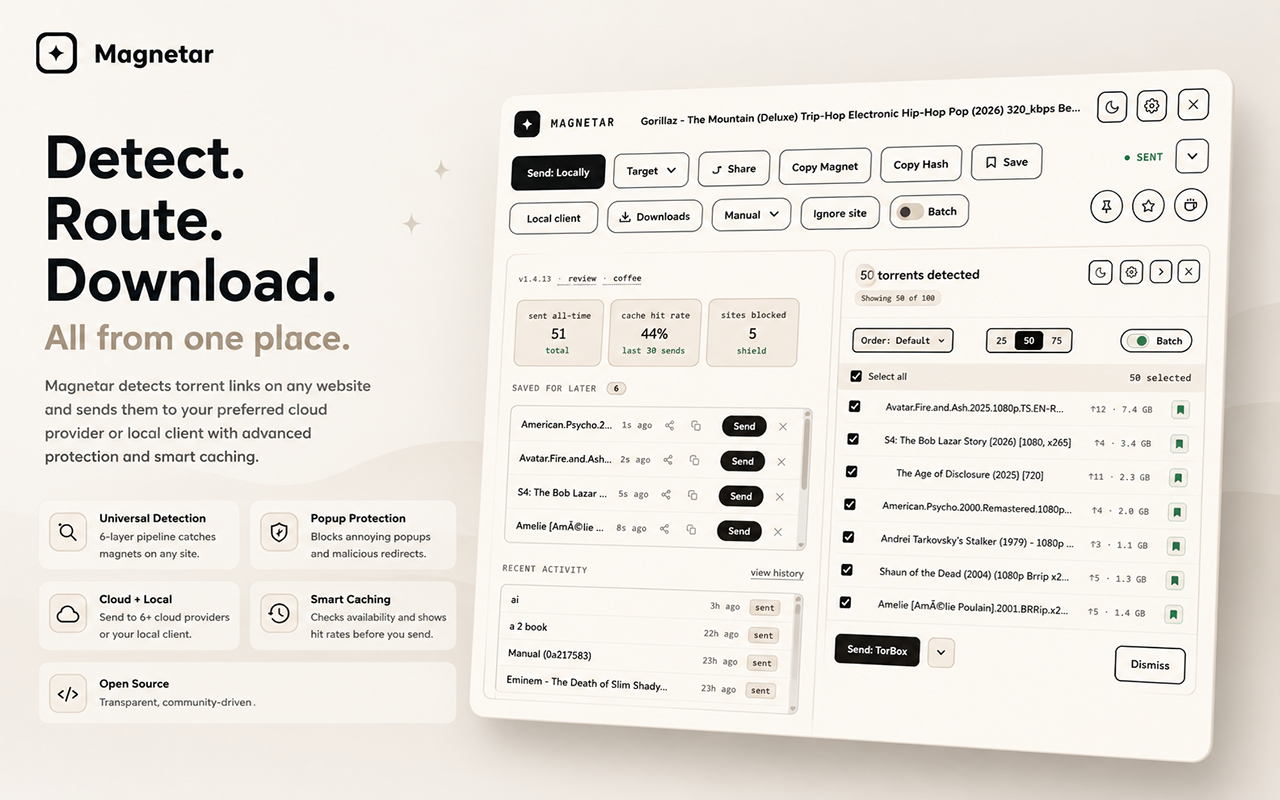
This page converts one hash manually. Magnetar detects torrent hashes and magnet links on webpages, then places the useful actions beside them so you can copy, open, send, or save without switching tabs.

Read more about Magnetar
Magnetar expanded toolbar with detection details, send targets, history, and batch mode

Advanced view

More control when needed

Magnetar also has an expanded view for deeper control, including Detection Details, send targets, history, Batch mode, and workflow options when a page needs more than one quick action.

Read more about Magnetar

Get Magnetar

The extension runs locally in your browser, with no extension analytics, telemetry or tracking.

Why install Magnetar?

Why install Magnetar?

Detect hashes on any webpage

Find supported torrent hashes and magnet links where they already appear.

Send where you want

Use TorBox, Real-Debrid, Premiumize, AllDebrid, RDT Client, qBittorrent, or a local client.

Batch mode for listing pages

Review and send multiple detected items without copying them one by one.

Local-first

No extension analytics, no telemetry, and no tracking.

Why this tool is different

Why this tool is different

Most hash to magnet tools feel like old forms with a button attached. This one keeps the workflow deliberate: paste a plain torrent hash, a full magnet link, or surrounding text, and the conversion happens locally in your browser without an account, upload, or lookup step.

It is lightweight, privacy-friendly, and designed to sit naturally beside Magnetar. Use this page when you need one clean manual conversion. Use Magnetar when you want the same workflow available directly where hashes already appear.

From hash to download

From hash to download

A torrent hash identifies the metadata for a BitTorrent item. Turning an info hash into a magnet link gives a client a standard way to use that identifier, discover the matching metadata, and continue a hash to BitTorrent or download from hash workflow without needing a torrent file up front.

Converter

How the converter works

The torrent hash converter finds a 40-character hexadecimal BTIH hash, normalizes it to lowercase, and builds a magnet link from the hash as magnet:?xt=urn:btih:<hash>. If you add a name, it appends an encoded dn= value.

Private by design

Runs locally

Spaces, line breaks, pasted text, and full magnet links are handled in the browser. The page does not upload your hash, look up torrent details, or try to recover a torrent file from the hash alone.

FAQ

FAQ

What is a hash to magnet converter?

A hash to magnet converter turns a torrent info hash into a magnet URI that compatible BitTorrent clients and services can open. It is useful when you need a magnet from hash without creating one by hand.

What is a torrent hash or BTIH hash?

A torrent hash is the identifier for a torrent's metadata. BTIH means BitTorrent Info Hash, and this converter accepts the common 40-character hexadecimal SHA1 form used in many magnet links.

Can a magnet link be made from only a hash?

Yes. A basic BTIH magnet link can be built from the hash alone using the xt parameter. A torrent name cannot be recovered from only the hash, but a compatible client can still use the magnet link to begin the lookup process.

Can the torrent name be detected from the hash?

No. A hash alone does not contain the torrent name. The optional name field on this page is only filled by you, or extracted from a pasted magnet link that already contains a name.

Does this page upload my hash?

No. The conversion runs locally in your browser. The pasted hash is not uploaded or looked up anywhere.

How do I download from a torrent hash?

Convert the hash into a magnet link, then open that magnet link in a compatible torrent client or service. The client uses the hash to find the matching torrent metadata through the BitTorrent network or configured services.

Can I get a torrent from a hash?

Not directly from the hash itself. A hash to torrent workflow still needs the matching metadata to be found from peers or another source before a client can work with it.

What is a magnet link?

A magnet link is a URI that points a compatible client at a torrent by identifier instead of requiring a torrent file first. For BTIH magnets, the torrent info hash is carried in the xt parameter.

How do I open the generated magnet link?

Use the Open Magnet button, or copy the generated link into a compatible torrent client or service that accepts magnet URIs.

What does Magnetar do differently?

This page converts one hash manually. Magnetar detects hashes and magnet links where they already appear on webpages and puts copy, send, open, save, batch, and detail tools beside them.